
Built for global customers
WhatsApp Business Messaging API Calculator
Stay in control, estimate your monthly WhatsApp messaging costs and budget smarter.
WhatsApp Calculator
Calculate your WhatsApp Business messaging costs
The WhatsApp Business API Calculator is a useful tool for estimating the cost of using the WhatsApp Business Platform (API) for communication. Drag the slider to estimate your monthly WhatsApp messaging costs! As of July 1, 2025, Meta switched from a conversation-based to a message-based pricing model, making it easier for businesses to calculate their monthly fees.
-
All Incoming Messages are free
-
All Free-Form Messages are free
-
Messages billed directly by Meta
-
Only delivered messages are billed
Price per message
$0.00
Cost breakdown
$0.00
Messages total
500
Message window
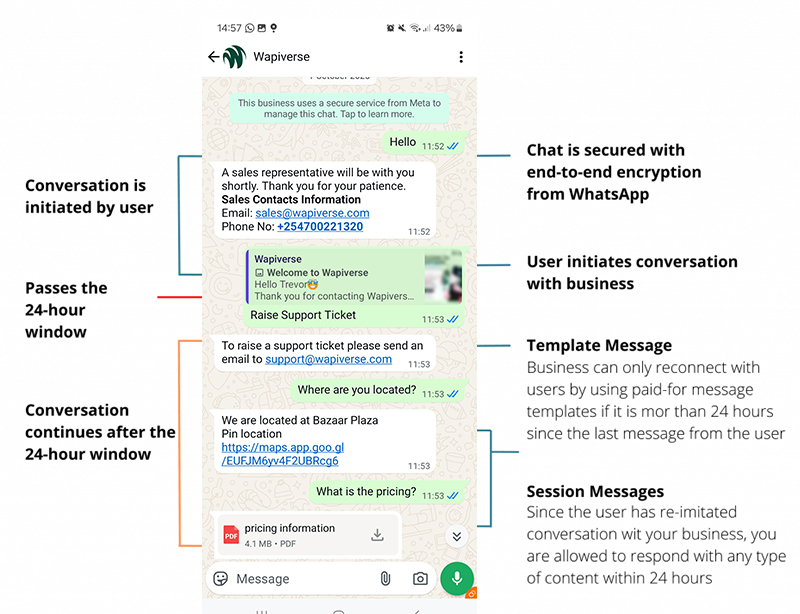
What 24-hour customer service window means
When a customer sends your business a message, a 24-hour customer service window begins (or restarts). Within this period, your business is free to reply with any type of message, including text, media, or interactive content. After the 24 hours expire, you’ll need to use approved message templates to reach out again.
-
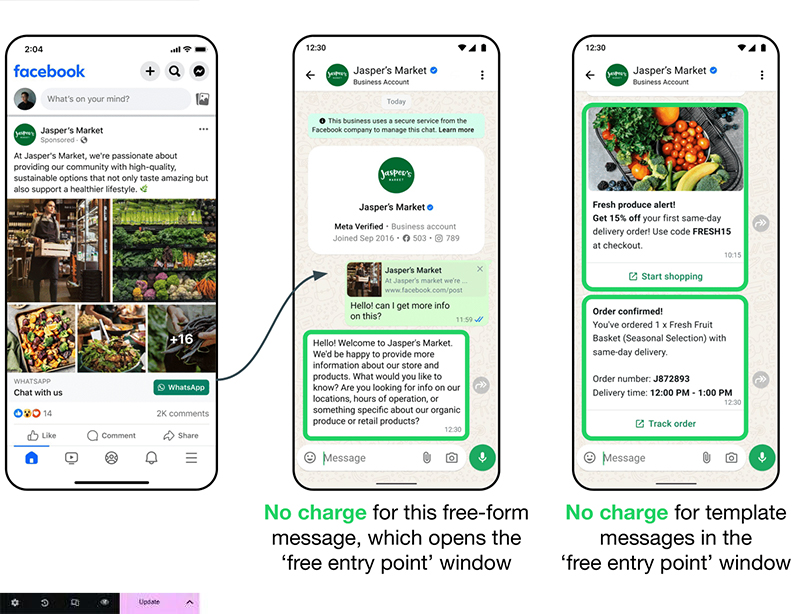
Free-form & Utility template messages are free
-
Marketing template messages are charged
-
Authentication messages are charged
WhatsApp Cloud API
WhatsApp Business
Cloud API Messaging Pricing
WhatsApp only charges when a template message is delivered, not when it is sent, and the cost depends on who the message is sent to and the category of the message, with rates varying by market and category pair. All inbound/customer messages are free
-
Free Form Messages are free
-
Marketing Template Messages
-
Utility Template Messages
-
Authentication Template Messages
Client management
Why Wapiverse as your Business Solution Provider
Why choose Wapiverse as your WhatsApp Business Cloud API Provider?
-
Meta Badged Partner
-
Competitive Pricing
-
WhatsApp Coexistence
Frequently Asked Questions
WhatsApp API Frequently asked questions
WhatsApp message templates are pre-approved, reusable messages used with the WhatsApp Business API. They allow businesses to:
Start new conversations outside the 24-hour service window
Send automated updates and notifications
Personalize messages with variables like customer names
Add interactive buttons, links, and media
Templates must be approved by Meta before use and are essential for sending marketing, utility, or authentication messages.
Marketing messages are template messages businesses use to promote products, services, or offers. Examples include:
Announcing promotions or discounts
Sharing new product launches
Sending newsletters or updates
Marketing messages are always charged per message, whether sent inside or outside the 24-hour service window.
Utility messages are template-based messages designed to support customers with timely and transactional updates, such as:
Delivery and shipping notifications
Order status updates
Post-purchase confirmations
Payment or billing reminders
They are free if sent during an open customer service window, but charged per message when sent outside the window.
Authentication messages are secure template messages that help verify a user’s identity with one-time passcodes (OTPs). Common uses include:
Account login or sign-up verification
Password recovery
Confirming sensitive transactions
Unlike utility messages, authentication messages are always charged, even within the 24-hour customer service window.
A WhatsApp customer service window is a 24-hour period that begins whenever a user sends your business a message. During this window, your team can reply with free-form responses or utility messages at no extra cost. Each time the customer messages again, the 24-hour timer resets, ensuring you can engage with them in real time without additional fees.
With the WhatsApp Business Platform, pricing is based on conversations, not individual messages. Costs vary depending on:
Conversation type (marketing, utility, authentication)
Recipient’s country
When a user messages your business, a 24-hour customer service window opens. Replies and utility templates sent within this window are free. However, if your business initiates a conversation with a template message outside this window, charges apply.
The WhatsApp Business Cloud API itself has no fixed monthly fee from Meta. Instead, businesses are charged per conversation based on:
Conversation type (marketing, utility, authentication)
Recipient’s country/region
Monthly costs also depend on your chosen WhatsApp BSP (Business Solution Provider), like Wapiverse, which may charge platform or feature-based fees. To estimate messaging costs, try the Wapiverse WhatsApp Messaging Cost Calculator.
Get Started
Ready to supercharge your business?
Grow sales and stay ahead in the competitive market by being among the first to benefit from our game-changing solutions.